


Faster online shopping with Click to Pay
Why you'll like it

Fast

Simple
Secure
How do I activate the Click to Pay service and register a card for online payments?
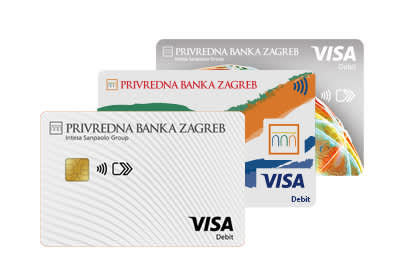
Which cards can be registered with Click to Pay?
- Visa Inspire Current Account Card in Euro
- Visa Current Account Card in Euro and Foreign Currency
- Visa Giro Account Card in Euro
Česta pitanja
The Click to Pay service is a card payment service on the Internet that enables faster and simpler purchases without the need to re-enter card data for each subsequent purchase.
At an online point of sale that supports Click to Pay, you must select the "Click to Pay" option. After identification, one of the cards stored in the Click to Pay profile is selected and the payment is confirmed.
The service can be used by a basic or additional user who has been issued a valid Visa debit card by PBZ, as well as by an authorized representative on the account, if he is also a user of the PBZ digital banking mobile application.
To use the Click to Pay service, valid PBZ Visa debit cards offered for selection in the PBZ digital banking mobile application can be registered:
- Visa Inspire current account card in EUR
- Visa current account card in EUR and foreign currency
- Visa card giro account in EUR
Multiple cards can be registered in the Click to Pay profile. When paying, an overview of all registered cards is available, and it is necessary to select the card with which you want to pay.
There is no fee to use the Click to Pay service.
The service is activated via the PBZ digital banking mobile app.
In the app, you need to select the card you want to register in the Click to Pay profile and activation is confirmed with the security credentials used for PBZ digital banking.
Via the PBZ digital banking mobile application, an individual card registered in the Click to Pay profile or the entire service can be deactivated. Deactivation is confirmed with the security credentials used for PBZ digital banking.
No. Deactivating an individual card or entire service does not affect payments that have been previously initiated and authorized.
Click to Pay can be used at online retailers that offer this service as a payment method.
The availability of the service can be recognized by the user by:
- the Click to Pay label
 ,or
- the "Click to Pay" option displayed during checkout.
The Click to Pay service is activated via the PBZ digital banking mobile app. After activation, the service can be used to pay at supported online sales points via various devices.
Click to Pay is intended for payment in online stores that support the service.
Apple Pay and Google Pay are digital wallets that, depending on the device, card and point of sale, can be used to pay in physical and online stores.
Payments via the Click to Pay service are subject to the available amount and limits for online payments that apply to the selected card.
Yes. During payment, the service provider (Visa) can verify the user's identity via the email address or mobile phone number stored in the Click to Pay profile.
Click to Pay applies security standards for online card payments. Security checks and additional user authentication can be used during payment.
If the card is reported lost, stolen or misused, its version in the Click to Pay profile also expires. After a new card is issued, it must be re-registered in the Click to Pay profile.
After a renewed card is issued, the user must re-register it in the Click to Pay profile in order to use it via the Click to Pay service.
The email address can be changed via the PBZ digital banking mobile app (Settings - My personal data), after which the new information is updated in the Click to Pay profile.
To change the mobile phone number, you must contact the Bank.
Kontaktirajte nas:
- u najbližoj PBZ poslovnici
- pozivom na besplatni broj telefona 0800 365 365
- na e-mail: pbz365@pbz.hr.
